
Bring an existing project in
Mess reads a project as it is. Nothing has to move, and setting it up writes only its own .mess folder.
- Open the folder. Open a project and choose your game’s folder. Mess opens on Meet, five short steps with a bar that shows where you are. The first lists what it found: the engine and its code modules, the history, the pages, folders it recognises, generated junk and names that break a convention. It has written nothing yet.
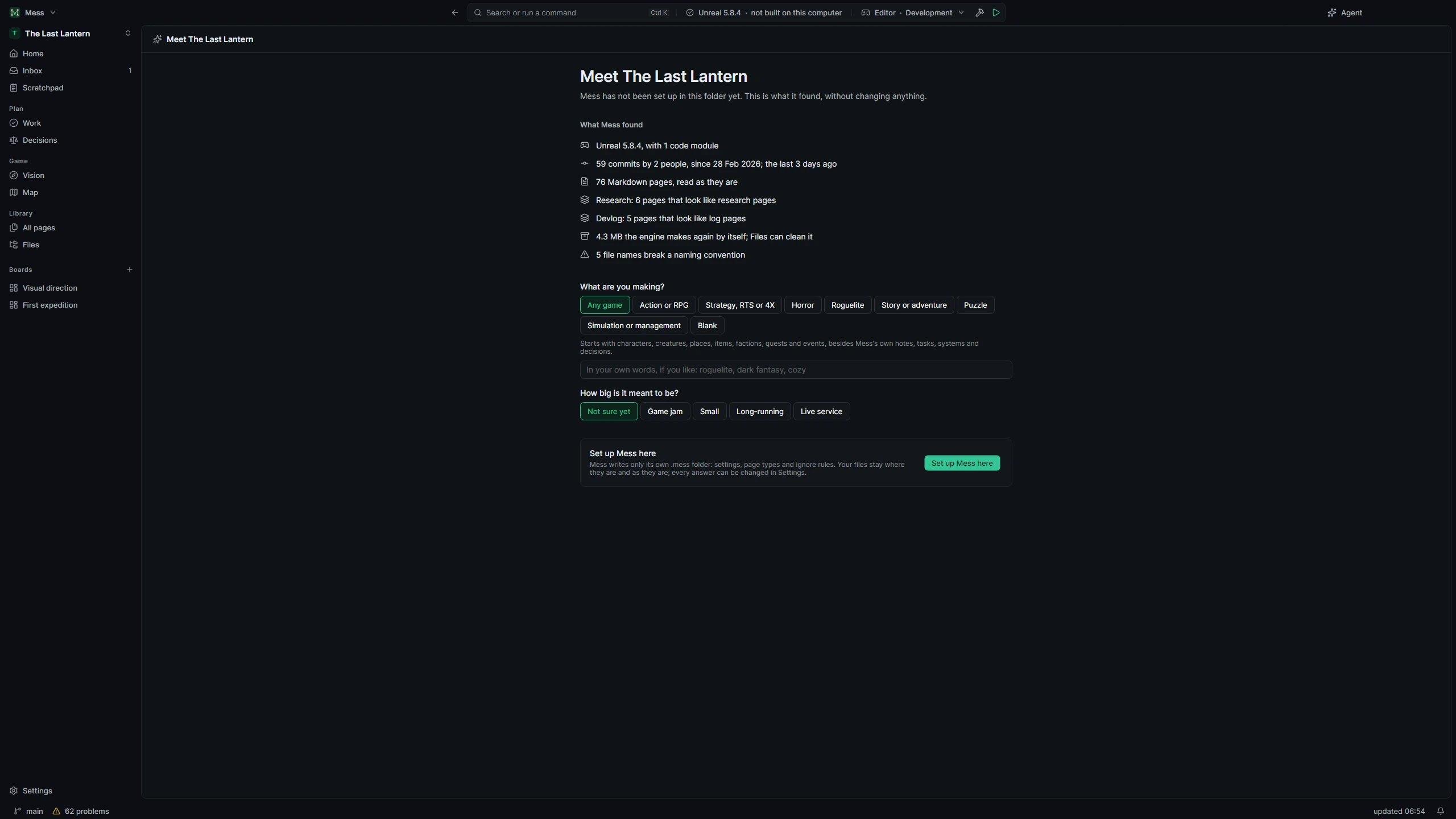
- Answer what you like, a step at a time. The game: what kind of game it is decides the page types it starts with; Blank gives only Mess’s own. Add the project’s own words for its genre, and how big it is meant to be. The team: who makes it, the hours a week, whether you have shipped before and what it is for. The schedule: how long your last project was planned for and how long it took, then the release you aim for with its date and how likely that date is. Every answer can be skipped and changed later in Settings › The game.
- Check and set it up. The Summary shows every answer at a glance, with Change beside each step. Set up Mess here writes
.mess: the settings, the page types and its ignore rules. - Cold start. Mess says what it already knows in numbers (files, how many sit in a system, pages and their types, milestones, tasks and the Vision), asks the game in a sentence, what comes next and what to leave alone, and lists the parts to check. Prepare the agent puts one brief in the agent panel on a branch of its own; nothing is sent until you press Send, and the fixes come back as one run to review. Settings › Agents opens Cold start again later.
- Let the folders say what they hold. The Inbox suggests types for folders whose names say what they hold, such as
ResearchorDevlog. Accepting one counts every page in it as that type, without editing the pages. - Adopt the naming you already follow. Files proposes rules your folders mostly keep already. Adopted, they show what breaks them.
- Fix what is mechanical. Problems lists broken links, wrong values and versioned names, each with the fix Mess plans. Fix a group at once; one undo takes it back.
- Give the code its system pages. For an engine project, each code module can get a system page pointing at its code, so the Map can say when a page falls behind.
- Check the knowledge roles. If the project keeps research, references and design apart, the Map’s Knowledge view shows whether Mess guessed their folders right.
Documentation written with ordinary Markdown links works as it is: Mess follows [text](../path.md) links as well as [[wikilinks]].