
Home
Home answers the question you have when you open a project again: where was I, and what should I do first? Everything on it comes from the project’s files, its Git history and its engine, without asking an agent.
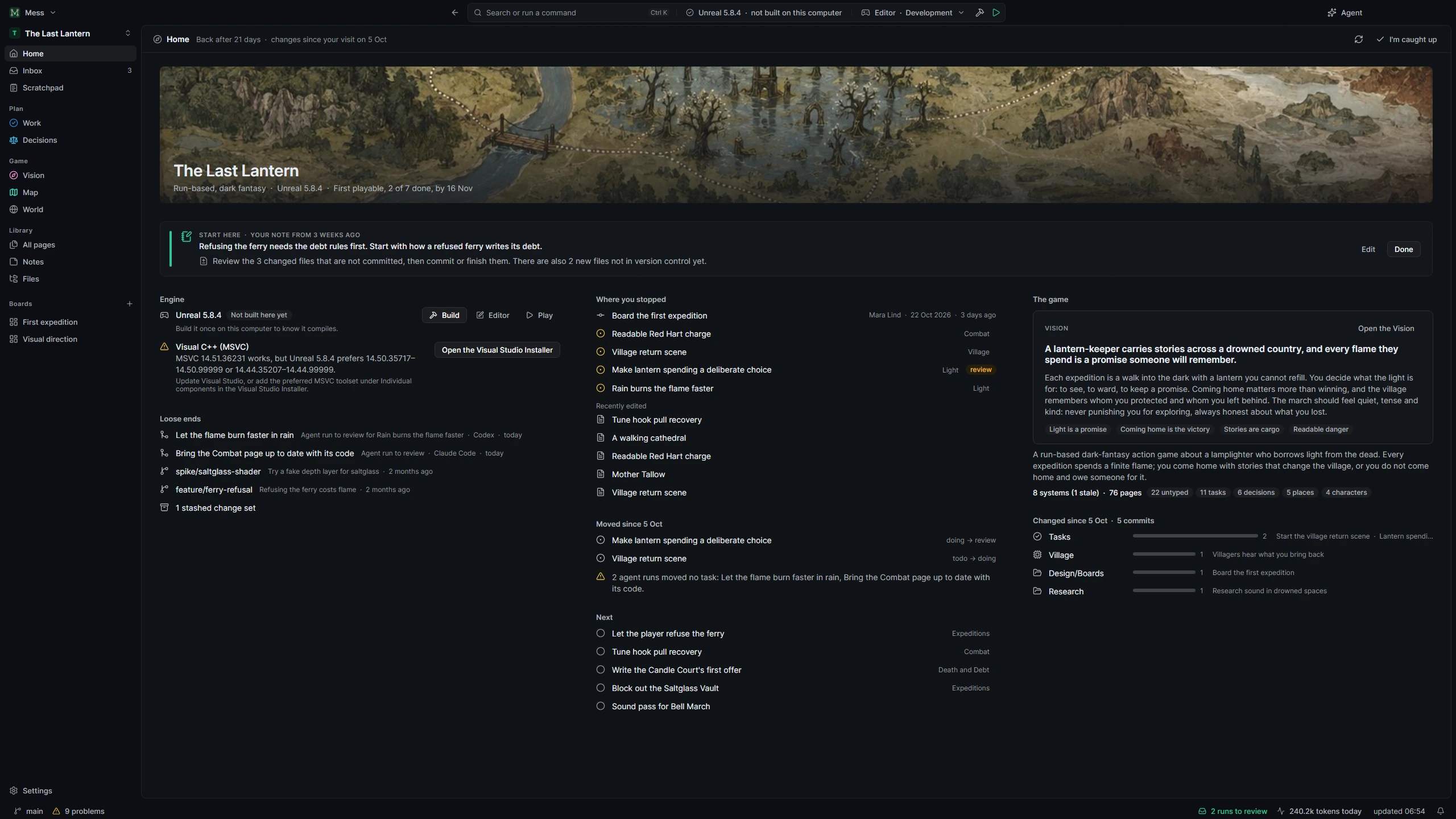
From the top
Section titled “From the top”- The Compass: beside the cover when Home runs three columns across, otherwise at the top of the game’s column: where the effort is heading against the current milestone, in words and on a dial, with the milestone’s progress and its pace. Open the Compass shows all of it. See Work and decisions.
- The cover: the project’s picture, its own words for the game, the engine, and the milestone you are working towards when the Compass card is left out (the card says where the milestone stands). Point at the cover to change the picture or its style.
- Start here: the one line you left when you last closed Mess, when there is one, since it is the most concrete next step there is; under it, the single next step Mess picked: commit or finish uncommitted work, look at a branch left open, fix the build, continue a task in progress, or bring a stale system page up to date.
- Engine: whether the project is built on this computer, with Build, Editor and Play, and any tool the engine wants that is missing or the wrong version, with the way to fix it.
- Loose ends: a warning with Set up Git when the project has no version control, changed and new files not in version control, agent runs to review, branches not merged, stashed changes and extra worktrees; what Start here already names is not repeated.
- Where you stopped: your last commit, the tasks in progress touched most recently, and the pages you edited last.
- Moved since: progress rather than activity: the tasks whose status moved since your visit, done first, and a warning when agent runs since then moved no task.
- The game: the Vision’s logline and pillars, the pitch from the README, and how many systems, pages and pages of each type there are.
- Next: the open tasks on the current milestone’s critical path: the important ones first, then those of the systems that got the least of the effort. Without a milestone, the open tasks, the important ones first.
- Changed since: the commits since your last visit, grouped by what they touched: each system whose code they changed, pages by type, and folders.
I’m caught up marks this visit, so the next Home counts changes from now.
Short and full
Section titled “Short and full”On a day you were already here, Home is short: your note, the first step, the engine when it has a problem, loose ends and what is in progress. After a break you get the full briefing. Settings › General can make Home always short or always full.
On a wide window Home sets its parts out in columns, three on a QHD screen and two on full HD; Settings › Appearance › Screens can keep it to one column instead.